Product Updates

Transparent updates showing how Retic is growing, what is new, and what is improved.

Pre-registration is closed: Retic is now a free public beta

Until now, these updates were written for the people who pre-registered. As of October 12, pre-registration is closed and Retic is open as a free public beta. There’s no invite email to wait for. You can start today.

What changed

  • Start without signing up: Open app.retic.io and build a goal tree right away as a guest. If you log in later, the goals and records you made carry over to your account.
  • Pro features are free during the beta: No payment is needed while the beta runs. We’ve already published the post-beta price (Pro at $5/month) on the pricing page.

If you’re logged in, the “Feedback” button at the top of the app sends us whatever got in your way or whatever you wish it did. We read every message that comes in during the beta.

More soon

Next, we’ll use what we hear during the beta to smooth out the daily check-in flow first. If something comes to mind while you use it, send it through the in-app “Feedback” button or to [email protected].
Trails are easier to find and manage, and progress is more accurate

Since opening up trails, we’ve been browsing and submitting them ourselves and fixing whatever got in the way. Along the way we also found two cases where progress was calculated differently from what actually happened, and fixed both.

What we polished in trails

  • Search covers descriptions too: A trail shows up even if “running” only appears in its description, not its title. You can also sort the list by most popular or newest.
  • “Couldn’t load” is no longer “no results”: A dropped connection used to look exactly like an empty search. Now we tell you when the list failed to load and show a retry button.
  • Managing your own trails: Filter your submissions by public, private, or in review, and sort them by how many people adopted them. Trails made by others now show the creator’s nickname.
  • Reasons when reporting: You can pick spam, inappropriate content, or copyright infringement, so we know where to look first when reviewing.

What we fixed in progress

  • Count-based habits: A habit like “3,000 jump rope reps” could show as done on the calendar even when you fell short. Now a day only counts as done once that day’s total reaches the target.
  • Habits under a goal: Goal progress used to count a habit only by whether you did it today, so missing a single day could flip an already-achieved goal back to unachieved. It now uses the completion rate across the whole period.

We also changed the save order so that goals you made as a guest aren’t lost if the connection drops while you log in.

More soon

Next, we’re getting ready to open Retic so anyone can start using it right away. Feedback is always welcome at [email protected].

We built the feature to browse someone else's goals: we call it Trail

Last update we said we were building a way to browse other people’s goals. Now it has a name: we call it a trail.

What we built

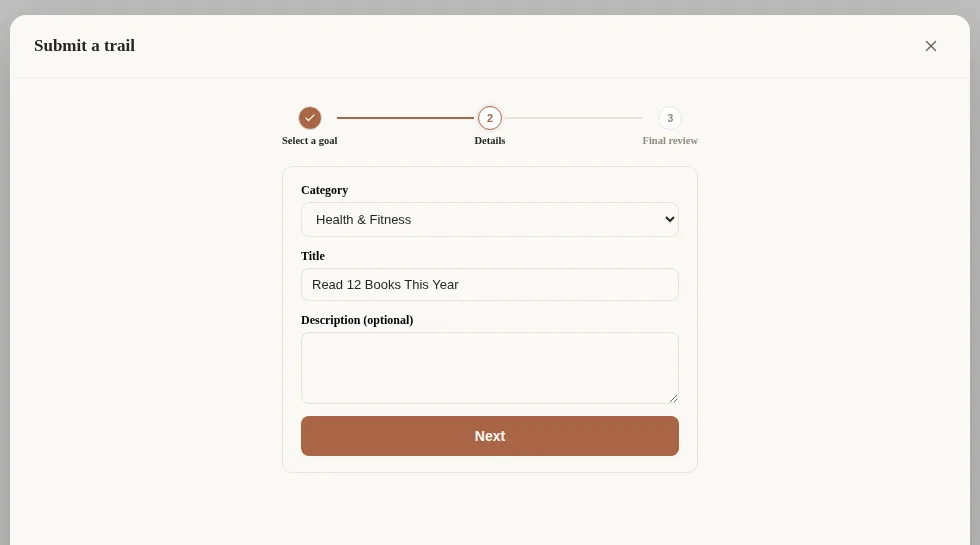
  • Trail submission as a 3-step wizard: Building the submit screen, it started feeling like an endless vertical scroll with no sense of how many steps were left. So we made it three clearly labeled steps (pick a goal, fill it in, review) connected by a progress line, and you can jump back to any completed step by clicking its circle.

The trail submission wizard. Step 1 (pick a goal) is marked done, and step 2 (fill it in) shows category, title, and description fields

  • Short share links: Each trail now gets a short numeric address instead of a long identifier, matching the website.
  • Trail and settings screens as modals: Instead of taking over the whole screen, these now open as a mid-size window over your goal tree, which stays visible in the background.

More soon

Next, we’re building the flow for previewing someone else’s goal inside a trail and adopting it straight into your own tree. Feedback is always welcome at [email protected]. We’ll share our launch-readiness news with pre-registered users first.

Getting ready to help you start from someone else's goal

This update is about the moment a blank goal tree feels intimidating. We’re building a way to browse other people’s goal structures and start from one, and we’ve redesigned how progress shows up on screen.

What we’re refining

  • In-app template browsing: Browse, preview, and adopt goal tree templates made by other users — all without leaving the app.
  • A redesigned progress gauge: Zoomed out, it’s a ring. Zoomed into a single goal, it’s a bar paired with your pace status — easier to read at a glance either way.
  • Deadline adjustment suggestions: If a goal is falling behind pace, instead of pushing you to grind harder, we now suggest adjusting the deadline.
  • A reworked “hide completed”: Hiding completed items now behaves more sensibly based on each habit’s own rhythm (daily, specific weekdays, etc.).
  • A starting screen for empty trees: If you haven’t created a goal yet, a short prompt now nudges you to start one.

We also split category management into its own screen, and refreshed the browser tab and home-screen icons.

More soon

Feedback is always welcome at [email protected]. We’ll share our launch-readiness news with pre-registered users first.

More ways to track habits, more accurate math

It hasn’t been long since pre-registration opened, but development hasn’t slowed down. This update is about giving habits more ways to be tracked, and fixing the rough edges in how goals get calculated.

What we’re refining

  • Three new habit types: Measurable habits for logging any amount you complete, consistency habits for holding a set frequency, and avoidance habits for tracking things you’re trying not to do. Habits that never quite fit a yes/no checkbox now have a home.
  • A pacing helper for numeric goals: Tell it your target and deadline, and it works out how much you need to do per day or week. Common units (reps, kg, pages, etc.) are now quick-select presets.
  • A redesigned item editor: We reworked the layout so goals and tasks show everything at a glance.
  • Billing-related pages, ready ahead of time: Terms of service, privacy policy, and refund policy are all in place for when payments go live after launch.

We also revisited how completion, rest days, and deadlines get calculated across goals and habits, fixing a few cases where the numbers didn’t quite add up.

More soon

Got a feature you’d like to see? Email us at [email protected]. We’ll let our pre-registered users know first when we’re ready to launch.

Here's how Retic is being built

Retic hasn’t officially launched yet — we’re currently taking pre-registrations. For everyone who’s signed up, here’s our first update on what we’ve been building and why.

“Breaking big goals down into daily, doable pieces, and turning them into habits that stick” — that’s the one idea we started from. Right now we’re building the core experience on web first, and we’ll keep refining it as we get closer to launch.

What we’re building right now

  • A hierarchical goal tree: Break any goal down into as many sub-goals and tasks as you need.
  • Four ways to measure progress: Milestone (auto-calculated), numeric, yes/no, and rate — pick whatever fits the goal.
  • Habit streaks: A calendar view of your consistency.
  • A foundation for real-time sync: Sign in and pick up the same data across browsers. (Mobile and desktop apps will come later.)

Let’s build this together

We want to shape Retic together with everyone who’s reserved a spot. If there’s a feature you’d love to see, or something that feels off, tell us at [email protected] — we’ll fold it into the next update. We’ll share launch news with our pre-registered users first.